


Cat Ear Headphones – Cute, Wireless & LED Styles
Filter en sorteer



Search
Use our smart search to quickly discover the products you need.
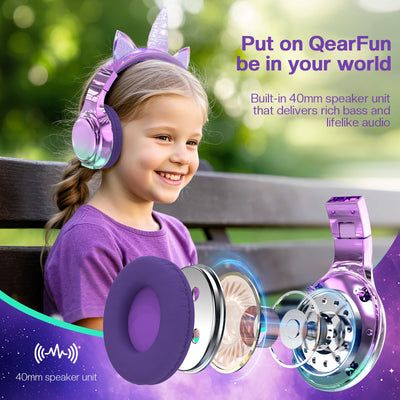
Cat ear headphones do two jobs at once. They play your music, and they add a pair of ears to your silhouette that people notice from across a room. Some have moulded plastic ears, some are soft and plush, and some light up.
This collection brings together the styles shoppers look for most: wireless pairs for commuting and study sessions, LED models built for streaming and photos, and gaming headsets with a mic attached. Colours run from pink and pastel through to black, white and purple, so there's a pair that suits a desk setup, a school bag, or a gift for someone who already owns three cat hoodies.
Shop Cat Ear Headphones for Every Style
The collection splits into a few distinct types, and the right one depends mostly on how you plan to use them.
Wireless & Bluetooth Cat Ear Headphones
Most pairs in this range connect over Bluetooth, which keeps the cable out of the way when you're walking, cleaning, or moving around the house. Wireless cat ear headphones need charging, so battery life is worth checking on the product page before you buy. Some models also include a 3.5mm cable as a backup for when the battery runs flat.
LED Cat Ear Headphones
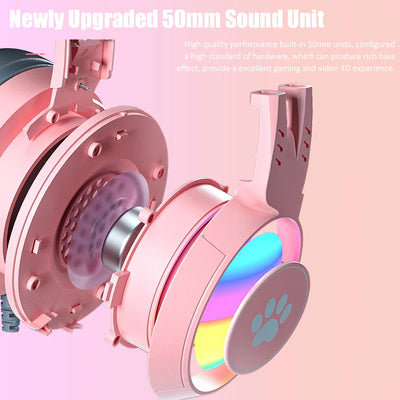
LED cat ear headphones light up along the ears, usually with a few colour modes and a button to cycle through them. They're popular with streamers and anyone taking photos, since the glow reads well on camera in a dim room. Lighting draws extra power, so most models let you switch it off and keep listening.
Cat Ear Gaming Headsets
A cat ear gaming headset adds a microphone, and often a deeper earcup with more padding for long sessions. Some connect over USB or 3.5mm rather than Bluetooth, which matters if you're pairing with a console. Check the connection type against your setup before ordering.
How to Choose the Best Cat Ear Headphones
A few details separate a pair you'll keep wearing from one that ends up on a shelf.
-
Connection. Bluetooth cat ear headphones suit phones and laptops. Wired or USB models are the safer bet for consoles and older gear. Some pairs handle both.
-
Fit. Headband adjustment range matters most for kids and teens, where an adult-sized band tends to slip. Check the listed measurements if you're buying for a younger wearer.
-
Comfort. Over-ear cups spread pressure differently than on-ear cups across a long session. Cup style and padding are noted on most product pages.
-
Battery. Stated playtime usually assumes the lights are off, so expect less if you run the LEDs constantly.
-
Microphone. Needed for calls, Discord, and party chat. Not every cat ear headset includes one — boom mics are far more common on gaming models than on fashion pairs.
-
Lighting. Decide whether you want the ears to glow or simply to look the part. Non-LED pairs are lighter and skip the charging routine entirely.
-
Care. Plush ears and fabric headbands need gentler handling than hard plastic, which is worth weighing up if they're going into a school bag every day.
Specs differ between models, so treat the individual product page as the source of truth for battery figures, drivers, and connection type.
Why Choose Cat Ear Headphones?
The appeal is mostly visual, and that's a fine reason to buy a pair. Cat ears change how a stream looks on camera, how an outfit reads in a photo, and how a desk feels when you sit down at it.
They also work well as a gift. Headphones get used, and the ears make them personal in a way a plain black pair never manages, which is why they turn up so often on birthday lists for teens, gamers and anime fans.
For cosplay and convention outfits, a pair pulls double duty as a prop and as working headphones. If you're building a full look, our cat ear headbands give you the same silhouette without the audio, and cat earmuffs are the fuzzier winter version.
Cat Ear Headphones for Gaming, Music & Everyday Use
Gaming is where the mic and the lighting earn their place. A cat ear gaming headset handles party chat and long co-op sessions, and the ears show up clearly on a webcam.
For music and video, a lighter fashion pair is usually the better companion. Bluetooth models move easily between a phone, a tablet, and a laptop with no cables to swap.
They cope with the ordinary things too: calls, commutes, homework, and background listening while you tidy up. Kids and teens tend to gravitate toward the plush and pastel designs, while black and LED models sit more naturally on a gaming desk.
Shopping for someone else? A pair fits neatly alongside our personalised cat gifts and the wider range of cat accessories for humans. If the whole room is going the same direction, our cat decor covers the walls and shelves.
Frequently Asked Questions About Cat Ear Headphones
Are cat ear headphones Bluetooth?
Many cat ear headphones are available with Bluetooth wireless connectivity, while some models may use a wired connection. The exact connection method depends on the model, so check the individual product listing for its available connectivity options before purchasing.
How do you connect cat ear headphones to Bluetooth?
To connect Bluetooth cat ear headphones, first turn on the headphones and activate pairing mode. Then open the Bluetooth settings on your phone, tablet, computer, or other compatible device and select the headphones from the available devices. The exact steps and pairing controls can vary by model.
How do you pair cat ear headphones?
Most wireless cat ear headphones can be paired by holding the power or Bluetooth button until the headphones enter pairing mode. Open Bluetooth settings on your device, select the headphones, and wait for the connection to complete. For model-specific instructions, refer to the product's included instructions.
Are cat ear headphones good for gaming?
Cat ear headphones can be a fun choice for gaming, especially for players who want a distinctive gaming setup. Depending on the model, features may include wireless connectivity, a microphone, LED lighting, or a gaming-oriented design. Check the individual product specifications to find a pair with the features you need.
How do you turn on cat ear headphones?
Most cat ear headphones turn on by pressing and holding the power button for a few seconds. You may see an indicator light or hear a sound when the headphones power on. Since button placement and controls vary between models, check the instructions for your specific pair if you're having trouble.
How do you turn on the lights on cat ear headphones?
If your cat ear headphones feature LED lighting, the lights are typically controlled using a dedicated button or one of the headphone controls. The method varies by model, and some designs may offer different lighting modes. Check the product instructions for the exact controls available on your headphones.
How do you turn off cat ear headphones?
Wireless cat ear headphones are generally turned off by pressing and holding the power button until the headphones indicate that they have powered down. The exact process can differ between models, so follow the instructions provided with your headphones for the correct shutdown procedure.
How do you use cat ear headphones?
Using cat ear headphones is generally straightforward. For wireless models, charge the headphones, turn them on, and connect them to a compatible device through Bluetooth. For wired models, connect the audio cable to your device. From there, you can use them for music, videos, gaming, calls, or everyday listening, depending on the model's features.
Can you use cat ear headphones with a phone?
Yes, compatible cat ear headphones can be used with smartphones. Wireless models can typically connect through Bluetooth, while wired models can connect through a compatible audio port or adapter. Always check the individual product listing to confirm compatibility with your phone.
Where can I buy cat ear headphones?
You can shop for cat ear headphones at Meowden in a variety of playful styles and designs. Browse the collection to find options that fit your preferred look and features, whether you're looking for headphones for gaming, music, everyday use, or a fun gift for a cat lover.
- Het kiezen van een selectie resulteert in een volledige paginavernieuwing.